

Email Validation
About built-in email validation in BigMailer
BigMailer offers inexpensive built-in email validation, so you can verify your contacts without using an expensive third-party provider. BigMailer can identify and remove up to 90% of typo spam traps, in addition to identifyng invalid email addresses, unlike most verification providers. Validation can be used with every way you can add contacts to BigMailer: manual list imports, embedded web forms, and API calls.
Only users with the Account Administrator role can buy email validation credits and/or setup automated refill. There is an account setting that allows sharing email validation credits with all brands in the account. Once that setting is enabled, all users in the account will be able to use validation, as long as there is a sufficient balance on the account.
Validation checks each address and returns a result. You can decide which records get removed before they reach your list by selecting an option on bulk import.
| Result code | What it means |
|---|---|
| EMAIL_UNDELIVERABLE | The email address is undeliverable. |
| EMAIL_RISKY | The email address is risky and likely to bounce. |
| EMAIL_UNKNOWN | The status of the email is unknown and likely to bounce. |
| TYPO | The email address contains a typo, possibly a typo spam trap. |
Risky and unknown emails (for example role-based or catch-all) can bounce at 30% or higher rate and engage at lower rates, so it's up to you to decide if you want to keep them on your list or prefer to not take a risk.
Choosing a removal option
During the bulk list import you choose one of 3 options for automatic removal. By default, we only remove undeliverable (and spam traps).
| Option | Removes | Recommended for |
|---|---|---|
| 1 | Undeliverable only | Most customers |
| 2 | Undeliverable and Risky | Recently inactive lists |
| 3 | Undeliverable, Risky, and Unknown | Lists older than 1 year |
If you don't want to miss out on any subscribers choose option 2 or 3, then download the error file and re-import those contacts with option 1 into a separate list. You can then pepper in some of the risky emails slowly into your email activity over a long period of time to validate through sending. Avoid using Risky on your 1st campaign with a new provider, or on a sender domain with no recent sending history, to prevent damage to your sender reputation and negative impact on your future inboxing.
Turning on validation
During a bulk list import via CSV file
During the bulk list import step, email validation is enabled by default, as long as there is a sufficient balance and credits are shared (account setting).
Only Administrators will see an option to buy additional credits, other users will not.
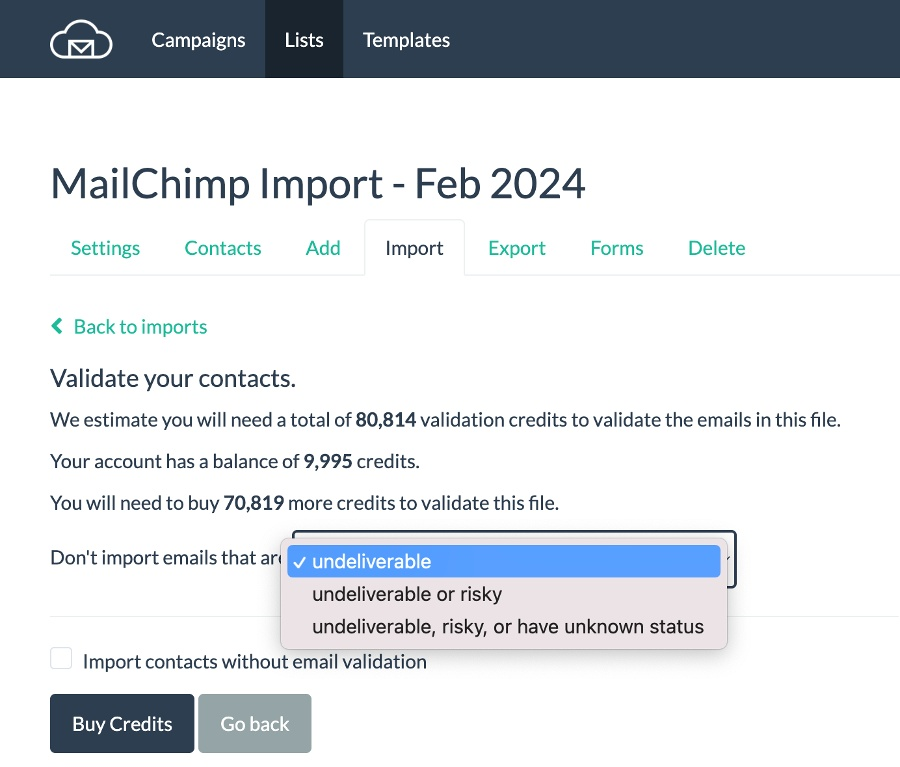
To import the file as-is and use no credits, check the box next to Import contacts without email validation.
On web forms
Turn on email validation on your embedded web forms with a single checkbox: Discard contacts with undeliverable email addresses. The form shows your current credit balance, since enabling this option uses validation credits. If there are no credits, the email validation stops, so it's best to enable auto-refill option in the billing area under Pre-paid tab.
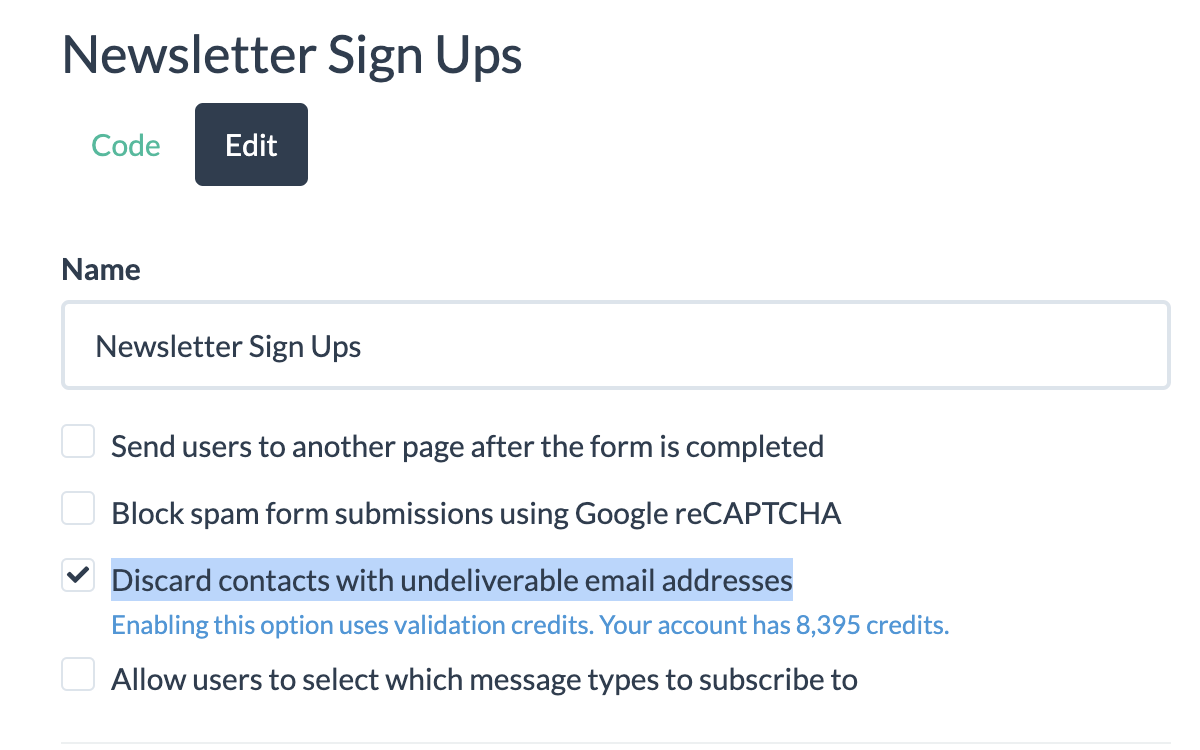
Validating at the form is the one place validation is preventative rather than corrective. It keeps bad addresses off the list instead of removing them later.
Web forms tend to collect a lot of typo spam traps, so BigMailer spam trap removal is highly effective on removing those to keep your lists clean.
Validation via APIs
To validate emails added via API, pass the flag validate=true to either of these endpoints: create contact or create or update contact. You can also enable validation on bulk list additions, which works in batches. When the validation flag is set, all emails added via API are validated and any invalid emails get discarded.
Reading your results
Once you confirm verification options, BigMailer imports your list without the emails you chose not to import. Verification speed is fast and won't cause major delays with your imports:
| List size | Verification time |
|---|---|
| Under 5,000 emails | Under 1 min |
| 50,000 emails | Under 10 min |
The confirmation page shows you the log of all your import jobs with error files linked.
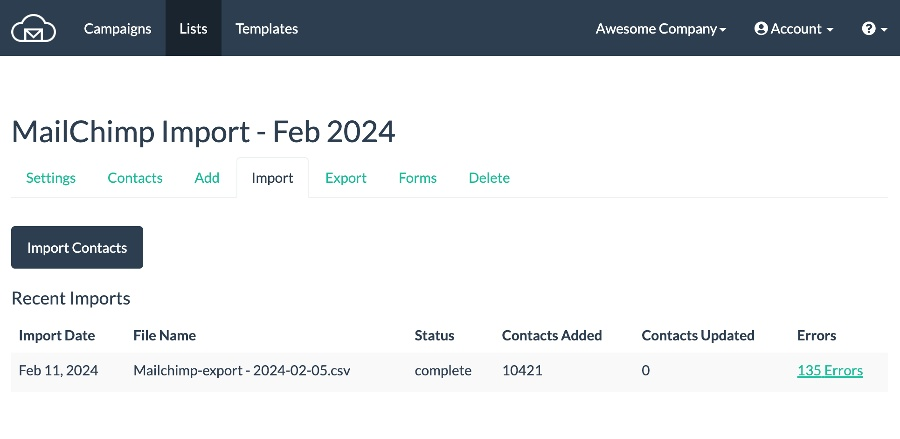
You can download and review your error file, if needed. The most common result codes in that file, after an import completes without validation, are listed below. Malformed and duplicate emails don't use validation credits.
| Result code | Description |
|---|---|
| INVALID_EMAIL | The column value is not a syntactically valid email address. |
| EMAIL_TOO_LONG | The email is more than 100 characters. |
| DUPLICATE_EMAIL | The email address was already encountered and imported from a previous row in the CSV file. |
| TOO_MANY_FIELDS | The row had too many fields (more than 100). |
| FIELD_TOO_LONG | The row has a column value that is too long (more than 255 characters). |
Email Validation Credits
As of August 2026, email verification credits are sold in bundles of 5k for $7.50, so it comes out to $1.5 per 1k credits. Any unused credits remain as a balance on your account.
Volume discounts are available for purchasing 100k, 300k, 500k, and 1M+ validation credits. Please reach out to support via live chat to buy credits with a volume discount.
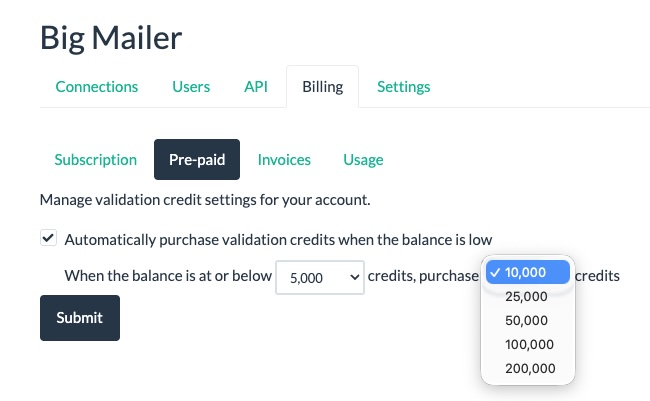
Customers with the Administrator role (only) can buy credits from their Billing page, under the Pre-Paid credits tab.
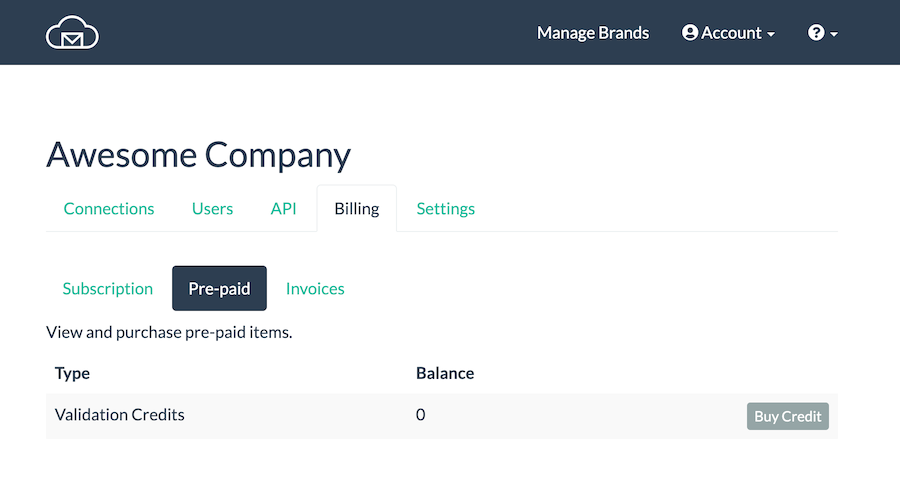
Auto-refill for validation credits
You can choose your low balance threshold and the amount of credits to auto-purchase, so validation on forms and API calls doesn't stop when your balance runs out.
What to expect from validation
BigMailer uses a combination of internal data and established 3rd party services for verifying your email list. While many providers will tell you their accuracy is 97-99%, we think these types of claims are misleading. Not all emails can be verified, so accuracy depends on your list age and the diversity of email domains on it, for example what percentage of your list is Yahoo. The older your list, and the more yahoo+aol addresses you have, the more invalid emails you will have. That's because providers like Yahoo (and more recently Gmail) suspend email accounts for inactivity, so those addresses are still valid (used to be) but not able to receive emails.
Verifying with BigMailer will not result in bounce rates high enough to cause issues with your sender reputation. If your list is older, consider removing both risky and unknown email addresses to lower your bounce rates.
Senders may still see some hard and soft bounces after using ANY email verification provider. As long as your hard bounce rate is below 2%, which may indicate natural list decay, your sender reputation and future inboxing won't suffer.
Email lists decay at 1-3% per month, with B2B lists decaying faster due to job switches. If you have not sent to your email list for more than 2 months, it's best to re-verify it to keep hard bounce rates low.
About spam traps
Typical email verification can help you remove invalid emails, but most providers are unable to identify spam traps you may have collected over the years. BigMailer can identify and remove up to 90% of typo spam traps. No provider can identify and remove all spam traps. Learn about spam trap types and how to remove them in our article on how to remove spam traps.
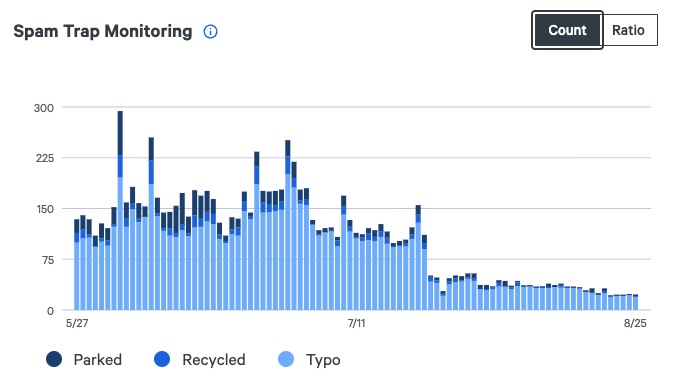
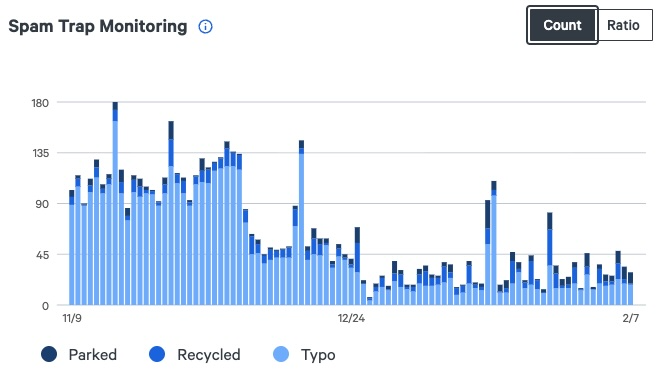
Some email delivery infrastructure providers track and show spam trap counts, without identifying them. Below are some charts for BigMailer agency customers that shows a drop in spam traps that were removed.
Unlike other providers, BigMailer has proof that its spam trap removal works.
The goal is to drop the spam trap ratio to below 0.1% to prevent negative impact on sender domain reputation, so removing 50% of spam traps can have a high impact on sender reputation.
Email Verification and Deliverability
List quality is only one of many factors influencing your deliverability. Spam traps are typically hiding in your inactives segment, so sending less frequently to inactives and having a sunset policy in place can help maintain a higher engagement rate for your sending domain and improve inboxing rates.
Please review our article on advanced deliverability tactics and implement as many strategies listed as possible. Need help with deliverability issues? Request a complimentary account audit via our chat support.
FAQ & Troubleshooting
My import removed more contacts than expected. Open the error file linked from the import archive page. It lists every skipped address with its result code, so you can see which results drove the removals. If a large share came back risky or unknown, the list is likely older. Re-import those addresses into a separate list with option 1 rather than discarding them.
I'm still getting bounces after validating. Some bounces after validation are normal with any provider. A hard bounce rate below 2% is safe and is in line with natural email list decay. If it's higher, check when the list was last verified: lists decay 1-3% per month, and anything unverified for more than 1-2 months should be re-verified. Soft-bounces are temporary and happen for many reasons (mailbox full, sender rejection, server non-responsive), these can't be prevented with email validation.
Do duplicate or malformed emails use credits? No. Syntactically invalid and duplicate emails are filtered out before validation runs and credits are used.
Need help with deliverability issues? Request your account audit via our chat support.
Updated about 2 months ago