

RSS to Email Campaign
RSS to Email Campaign
To setup an email based on RSS feed you need to create a new campaign of type RSS - click on "Create New" on campaign dashboard (Campaigns tab in header) then select RSS campaign type. You can review scheduling options in this article. Make sure your RSS feed is using a valid published date - the recommended date format is RFC822.
You can pull in a single/latest RSS item by dropping merge tags into your template via the menu options in the drag and drop editor. We have a simple template for an RSS campaign in our template library.
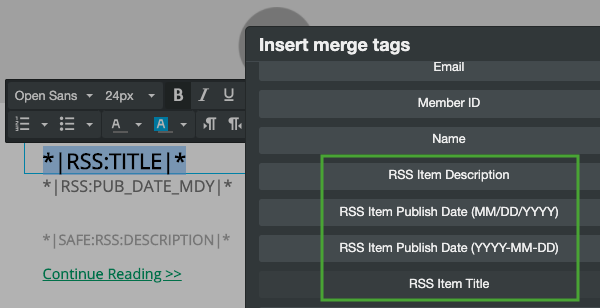
To add merge tags into your HTML template code or to loop through multiple RSS items you would need to use merge tags as part of HTML block.
RSS Images and Merge Tags
You can control merge tags syntax in the drag-and-drop editor using the custom HTML element.
You can use RSSITEM:IMAGE or RSSITEM:IMAGE_URL to add an RSS item image into your template. The first will output a full HTML image tag for the item image, the second will just be the url. The first you will want to use with the SAFE / HTML filter so that the content is not escaped, example:
*|RSSITEMS:|*
*|SAFE:RSSITEM:IMAGE|*
*|END:RSSITEMS|*
Or to output just the latest rss image:
*|SAFE:RSS:IMAGE|*
If you want to generate the IMG tag yourself and get the URL of the image:
*|RSSITEMS:|*
*|RSSITEM:IMAGE_URL|*
*|END:RSSITEMS|*
*|RSSITEMS:|*
Or just for the latest image URL:
*|RSS:IMAGE_URL|*
Please refer to this document for merge tags syntax and examples.
Common Issues with RSS to Email Campaigns:
Please review this list of most common issues if you are having troubles setting up your new campaign or your campaign isn't sending when you expect it to:
If your campaign isn't picking up new posts and not sending emails take a look at the published date field in your RSS feed as it might not be in a valid RSS format. The recommended date format is RFC822.
Generate a valid pub date with PHP using the constant DATE_RFC822 constant, like this
echo date(DATE_RFC822)
RSS feeds may not include a standalone image item you can reference with merge tags and instead may just include the image as part of content body, in which case you will have limited options for formatting the image appearance in your email template.
Many websites, and especially those managed with a content management system (CMS) or using caching solutions like Cloudflare, can have security plugins or firewalls that prevent access to your RSS feed. In this case an email marketing platform may not be able to access your feed and publish your updates to an email unless you remove the restrictions, which often can be done just for the feed URL.
Updated 3 months ago