

Automation/Drip Campaigns
Working with Automation or Drip Campaigns
About Automation Campaigns in BigMailer
An Automation campaign can consist of 1 or more emails triggered by an event. It can be setup as a simple confirmation for a signup action, often referred to as an auto-responder. A common use case for an auto-responder is a newsletter signup confirmation email.
The most typical trigger for an Automation campaign is a contact being added to a list, which can happen via: manual CSV file import, web form, transactional email, API call, or a 3rd party integration. The simplest way to test an Automation campaign is so add your test email manually using an "Add" tab under a given List.
The emails in a sequence can be triggered with:
- A trigger condition based on engagement, AND
- Optional time delay specified in number of hours, days, or weeks.
Each email in the Automation campaign can be in either HTML or text-only format and each email can be activated or paused at anytime. A sequence can also be re-arranged at anytime - you can drag an email step into a new position in a sequence but no history of changes in the sequence is stored (no revision history).
Examples of Automation Campaigns
There are many different type of automation campaigns – here are some of the most common examples:
-
Welcome Email
This can be a single email or a sequence. The 1st email can set expectations on the the type of emails to expect and frequency of updates, and any special offers or coupons that may have been promised for getting on a lit (common for online retailers). Consider including links to your most popular content either in the 1st email or in the follow up email.
-
New Subscriber/Customer On-boarding
These type of emails help your customers get started with a product or service by addressing friction points, answering FAQs, or providing links to helpful resources, and often reduce the number of support inquiries.
-
Nurture Sequence
Feature highlights, usage tips, learning resources, review/rating requests, and customer case studies can help build product loyalty and encourage ongoing use of service and/or upgrades.
TIP: Consider giving your customers sufficient time to use your product/service before asking for a review/feedback.
Here is an example of an automation sequence in BigMailer: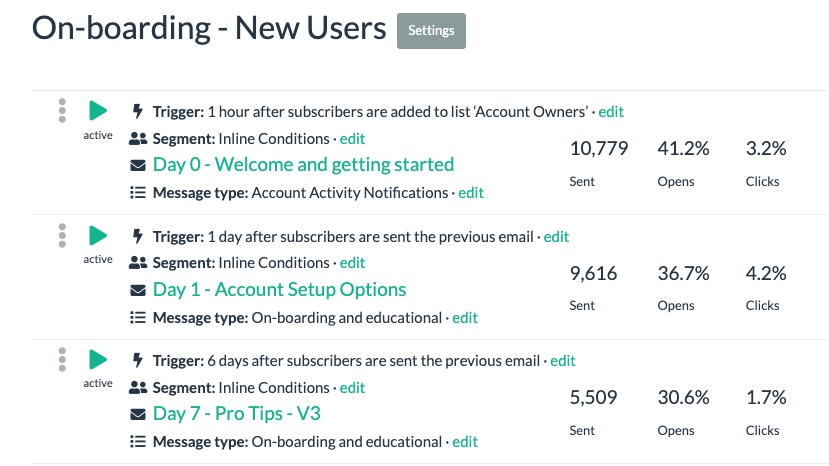
-
RSS-to-email Updates
BigMailer allows you to send new blog post email updates via RSS. This type of campaign goes out automatically when a new blog post is published.
Setting up an Automation Campaign in BigMailer
An Automation campaign in BigMailer can be a single email (e.g. a signup confirmation or welcome) or a sequence of emails, that are typically triggered based on something happening to the subscriber record or an action performed. In addition to action, an automated email can be triggered with a time delay in hours, days, or weeks, or have no delay.
After the Automation campaign sends the 1st email the future steps in the sequence can be scheduled in 2 ways:
- Relative to the first email, e.g. X days after the same trigger as the 1st email. For example, you can send a welcome email immediately after someone signs up for your newsletter or creates an account, then send weekly emails after 7, 14, 21 days, etc.
- Relative to the previous email and/or action taken, e.g. X days after a previous email in the sequence is sent or after a contact opens or clicks on the previous email.
Ready to get started? Here are the steps to setup your Automation campaign.
- Log into your BigMailer account and select a brand you want to create a campaign under. Don’t have a BigMailer account? Create a free account – all accounts start on a Free plan, no credit card required.
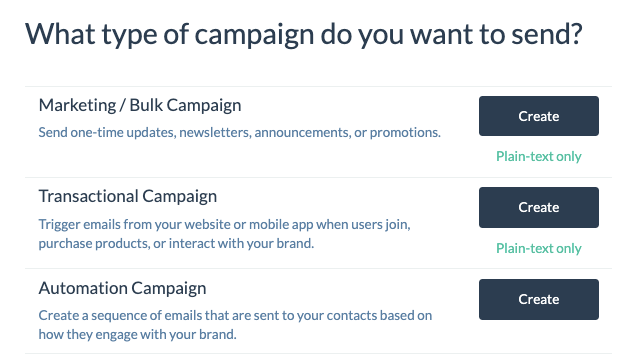
- Click on Campaigns tab in the site header, then on “Create Campaign” button.
- Click on “Create” under the Automation section.
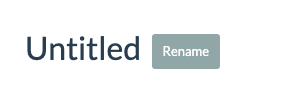
Once on the Campaign page you need to give your Automation campaign a name, click on small “rename” tag next to name.
Click on “Add Email” to create your first email step, then click on “Edit” links to define each element of an email – trigger, message type, and segment (optional).
The most typical trigger for a 1st or only step in an Automation campaign is subscriber record being added to a specific list.
TIP: Create a List named Test and always use it for testing your automation campaigns before finalizing against customer list.
How to Add Contacts to a List:
There are several ways to add new contacts to a List in BigMailer.
- Manual import of a CSV file.
- An email collection webform that sends customer data to a List. In BigMailer you have 2 options, embed the form into your website or just link to a form as a standalone page on BigMailer.
- An API call (e.g. to create a contact when someone makes a purchase).
- An integration (when someone performs an action on a 3rd party platform a record of contact is created at BigMailer). So the data can first enter your CRM or a Google spreadsheet, then pushed to BigMailer.
- Manual adding of records one-by-one, useful for adding your own records for testing.
How to Include/Exclude Subscribers From Getting an Email
If you want your subscribers to only get some emails in your automation campaign, or exit your sequence based on their status change you would need to manage this via custom fields. For example, you could have a custom field isPaidMember or LastOrderDate and update that field with an API call from your application. Then, you would use segmentation on an email step to qualify them for getting the email.
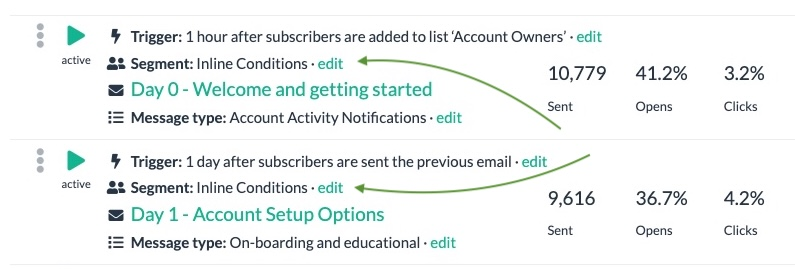
Clicking on Edit link will open the typical segmentation options.
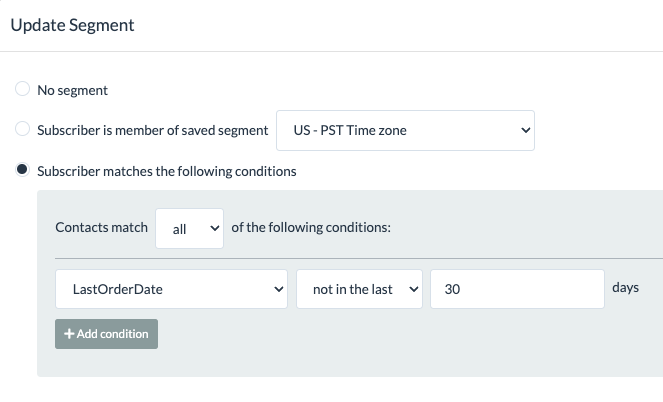
Only the subscriber who meet your segmentation criteria will receive the email.
Birthday and Anniversary Emails
A recurring automation option is available for sending emails based on dates such as birthdays and anniversaries, making it easier to automate ongoing reminder campaigns.
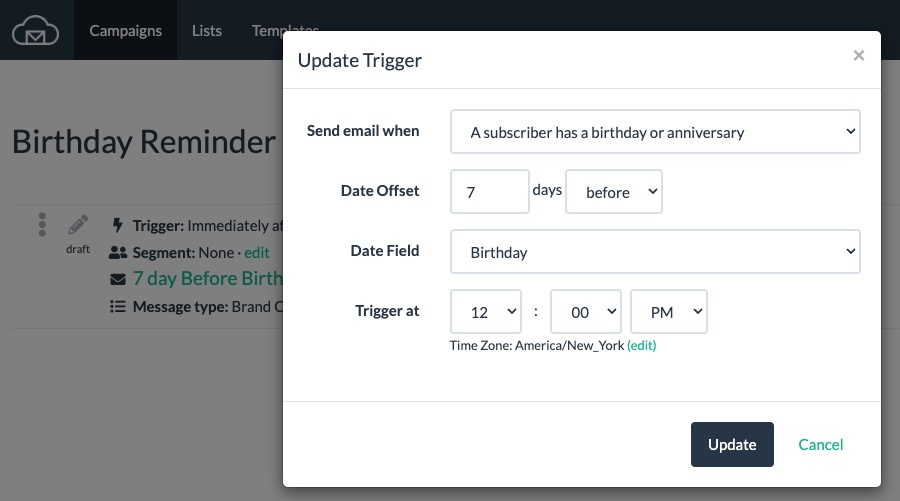
Allow Duplicates Setting
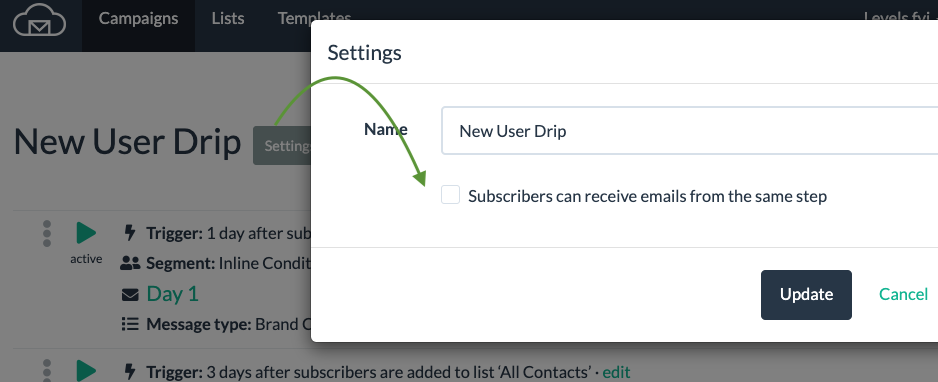
You control the automation settings and the time to allow to pass before a subscriber can re-enter the automation (up to 365 days). By default, automation campaigns don't allow duplicates - subscribers can't receive the same automation campaign/email more than once unless the setting overrides this default behavior.
How to Setup an Double Opt-In Confirmation
BigMailer does not support built-in double opt-in (DOP) functionality because it benefits traditional ESPs more than marketers (see this article from Litmus). Mailchimp switched to SOI as their default in 2017 because their data showed that marketers were loosing up to 60% of their subscribers to the DOP process. However, you can setup an DOP automation campaign yourself.
To setup a DOP you need to create an automation campaign first, following the steps outline in the section above. Your trigger would be a subscriber being added to a specific list you are adding your subscribers to. Your DOP confirmation email should only have ONE link it it – linking to your website’s confirmation page. Then, you create a segment based on clicks in your DOP campaign.

You can use this new segment on any future campaigns, as you see fit – all or some.
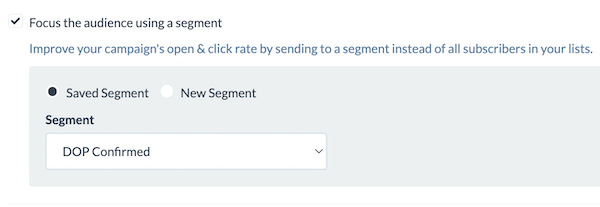
If you are worried about bot signups you can add re-CAPTCHA on your forms as an alternative to DOP process.
Automation Campaign Analytics
Automation campaigns have the same analytics as marketing campaigns, once they are set live and emails are sent. As soon as you set your email Live and it’s no longer in Draft mode you will see “Report” option next to the email step in the email list view (see screenshots in the Automation Examples section above). You can see engagement metrics like open and click rates, as well as unsubscribes, bounces, and complaints for every email in an Automation campaign.
The stats for Automation campaign do NOT reset when an email is modified or moved around in a sequence. So if you want to track performance of a single step in a sequence you may want to pause the step and create a new version to replace it so you can compare engagement stats before/after the changes made.
Automation Campaign Types
- A single welcome email sent when a new subscriber is added to the list or a sequence of emails.
- An email sequence, for example on-boarding or nurture sequence with tips on using a product or advice from experts. This type of sequence can start with an event outside BigMailer and contact record is pushed to BigMailer via an integration or via an API call from an internal web application.
A marketing automation – an email or a sequence triggered by a customer interaction with a website or product. For example, if a subscriber visits a specific article they are tagged as interested in a given topic and sent relevant content or promotional emails. To set this up you have to add code to your website to fire an API call to BigMailer to either a) update your customer record with info on the action or interest or b) add that customer to a new List which can trigger an Automation campaign.
Email Scheduling Logic
The automation emails are scheduled at the time of the trigger, ignoring any delay rules. So if the trigger for an email step is "after previous email is SENT" then the email is scheduled as soon as the previous email is SENT, regardless of a delay rule. Re-arranging steps for a live sequence, or changing delay rules, will not have any impact on emails already scheduled.
One way to make changes to a live sequence is to copy the step you want to move, then pause original in its place and set live the new step in new place or with new trigger rule. This way you preserve stats for the original rules used.
Using the copy and pause method doesn't prevent any subscribers from receiving the same email twice, it's just a way to not mix up stats for states before/after change is made. You can try to exclude subscribers from the new version using campaign engagement on a segment as "didn't open any campaigns in X days" if there are no other emails being sent to a subscriber (e.g. transactional).
Exiting a Sequence
The most common way for a susbscriber to exit a sequence is by being filtered out from the eligible segment. Another way that’s based on the action that happens on your website (e.g. a conversion event) you would need to:
- Setup a message type to use for your automation sequence, for example “Free trial on-boarding”
- When a subscriber completes a desired action on your website, for example upgrades to a paid subscription, you need to fire an Update Contact API call to BigMailer to unsubscribe them from a given message type that’s used by your automation sequence.
Message types are managed from the menu under your brand name in the header. When a new message type is added, all existing subscribers are automatically opted into it, e.g. they are eligible to get emails for that new message type. You can also place them into a new sequence by adding them to a new list, for example “Paid Subscribers”, in the same API call you make from your website or application.
Automation Sending Logic and Troubleshooting
The emails in the Automation Campaign get sent if there is an active email step when a trigger condition evaluates. When you create an email it starts in Draft mode until you set it live by clicking on “Set Live“.
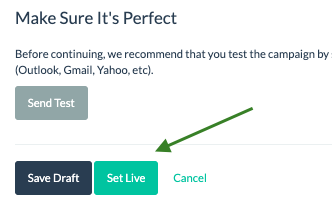
If you use a trigger based on adding contacts to a list the email step needs to be active before the contacts are added. To trigger an email the contacts can be added to a List either manually one by one for testing, in bulk via CSV import, or via on ongoing basis via signup forms.
The automation emails are scheduled at the time of the trigger event, ignoring any delay rules. So if the trigger for an email step is “after previous email is sent” then the email is scheduled as soon as the previous email is sent, regardless of a delay rule.
It’s not possible for a subscriber to receive the same sequence more than once, duplicates aren’t allowed in an automation campaign, to avoid unintended consequences.
Making and Testing Changes to a Sequence
Re-arranging steps for a live sequence, or changing delay rules, will not have impact on emails already scheduled.
One way to make changes to a live sequence is to copy the step you want to move, then pause original in its place and set live the new step in new place. This way you preserve stats for the original rules used. Using the copy and pause method doesn’t prevent any subscribers from receiving the same email twice, if the new email appears later in the same sequence. It’s just one way to not mix up stats for states before/after change is made. You can exclude subscribers from the new version using campaign engagement on a segment as “didn’t open any campaigns in X days” if there are no other emails being sent to subscriber (e.g. transactional).
Triggering Automations from Other Apps
What Kind of Automations Can You Create?
Below is a list of actions and example scenarios that can be setup with BigMailer.
IF [something happens elsewhere] > Add a contact in BigMailer
Examples:
- IF a new response is collected via Google Forms ADD a contact into List [some-name] in BigMailer
- IF a new row added to Google Spreadsheet ADD a contact into List [some-name] in BigMailer
- IF a new contact is added in [some other ESP] also ADD a contact into List [some-name] in BigMailer
- IF a new customer/sale/order is added in [some platform] ADD a contact into List [some-name] in BigMailer
IF [something happens elsewhere] > Update existing contact in BigMailer
Examples:
- IF a customer completes a purchase UPDATE their record with new fields for order date or amount
- IF a customer redeems an offer UPDATE their record with a new field that controls an email sequence
- IF a customer performs an action UPDATE their interest preferences in BigMailer
IF a contact is added in BigMailer > DO [this action somewhere else]
Examples:
- IF a new contact is added to List [Member] in BigMailer also add a record in [some platform].
- IF a new contact is added to List [Paying Customer] in BigMailer send a message via [Gmail/Slack/other].
You can use BigMailer webhooks to send some event data back to your application or 3rd party tool, for example:
- IF a contact hard bounced, complained, or unsubscribed remove them from active list in [some platform].
- IF a contact opened/clicked on an email update their record in [some platform].
What Integration Should I Use?
Zapier and Make are the most popular integration platforms, with some differences. Zapier has more integrations, so it's more likely you'll find the apps you're using, and it's easier for those new to automations. You can do more in Make, but it's more complicated to use and you may need a basic understanding of programming for some parts.
If you are new to integrations, this article comparing Zapier and Integromat (now Make.com) may help.
###
Ready to get started? Click on Campaigns tab in the site header, then on “Create Campaign” button and select “Automation” campaign from the list. Don’t have a BigMailer account? Try out BigMailer with a free account.
Need assistance with your Automation Campaign? Reach out via chat icon once you log in, help is available 7 days a week.
Updated 2 months ago